

Olaf Hartong
Microsoft recently published a new feature for Defender for Endpoint (MDE) called Custom Collection. At FalconForce, we’ve had the great privilege over the last year to work with the development team as a design partner, testing this feature and providing feedback.
While MDE has been a great product with a valuable data set for threat hunting, detection engineering, and alert analysis, one thing has limited teams’ ability to gain deep visibility – up until now: the capping of events. We have discussed this topic several times in previous blog posts, so feel free to read up on it at the provided links.
- Sysmon vs Microsoft Defender for Endpoint, MDE Internals 0x01
- Microsoft Defender for Endpoint Internals 0x02 — Audit Settings and Telemetry
- Microsoft Defender for Endpoint Internals 0x03 — MDE telemetry unreliability and log augmentation
- Microsoft Defender for Endpoint Internals 0x04 — Timeline telemetry
- Microsoft Defender for Endpoint Internals 0x05 — Telemetry for sensitive actions
What is it
Custom Collection, in short, is what the name implies: it’s an MDE feature that lets users define a custom set of rules to be collected alongside regular MDE telemetry, but without a hard cap on the number of events we’re collecting. That last part isn’t entirely accurate; there *is* a cap of 25000 events per day per configured rule, per device, primarily to protect you from very high costs. This cap should not be an issue; you shouldn’t have configurations that generate that many events per day.
These custom collection rules can be applied to the same data sources MDE collects using the same schema. Currently, the following tables are supported:
DeviceProcessEvents
DeviceNetworkEvents
DeviceFileEvents
DeviceImageloadEvents
DeviceScriptEvents (AMSI events not available in Advanced Hunting)
The collected data is not stored in the MDE tables, which are included with the license at a fixed fee, but is instead sent directly to Sentinel tables. This means that this additional data will incur an extra cost, which is understandable, but important to be aware of. The tables that will be stored in Sentinel will follow the same schema with the addition of some fields: RuleName, RuleLastModificationTime and Type. These make it easy to understand, for example, which rule may require tuning.
The tables in Sentinel will also have a slightly different name to avoid conflicts with the native MDE data you might be ingesting there. Essentially, the ”custom” word gets added to all of them, resulting in the following names:
DeviceCustomProcessEvents
DeviceCustomNetworkEvents
DeviceCustomFileEvents
DeviceCustomImageloadEvents
DeviceCustomScriptEvents
Why should you care
There are many reasons why Custom Collection is a great feature to us. Some of the biggest are:
- Uncapped telemetry for the events you care about, without needing additional agent(s).
- Central management of these rules, without additional overhead.
- Flexibility per device group.
As we discussed earlier, there are two main limitations to the default MDE telemetry: event capping and event filtering. This leads to an incomplete picture of what might be important to you. We see many organizations augment the MDE telemetry with additional solutions, like WDAC in audit mode or, more commonly, Sysmon. While these are perfectly fine options, they also introduce significantly more administrative overhead, as well as two additional agents that need to be installed and maintained: Sysmon and a log collection agent. And we are not even discussing the data structure, which is different, making querying the data less convenient.
The new Custom Collection feature might be the perfect replacement, assuming you have MDE and the current table set covers your primary needs.
Custom Collection essentially allows you to create a set of rules for data collection, similar to Sysmon, but with more fine-grained control over what to include and exclude. Additionally, these rules can be assigned to tagged device groups, allowing you to get specific events only from those groups. You can also assign rules to the whole organization.
These custom collection rules are a separate part of the MDE configuration and will be updated by the agent more frequently than the default configuration. In my experience, newly added custom collection rules or tags become active within 20 minutes to an hour, as long as the targeted machines are online, which allows for a fair level of flexibility.
You can, for example, imagine creating a “verbose” set of logging for machines impacted by a high alert and automatically assign them to the device group that will receive those additional custom collection rules for a certain period of time. Don’t forget to also remove it, as these additional events could become costly.
Other examples include monitoring your web servers for potential web shells being added to their folder structure. Since MDE doesn’t monitor the creation of all file types by default, and certainly not in all locations, this feature allows you to create specific monitoring for those files and folders. These are just a couple of small examples; I’m confident you have many others in mind.
How to use it
To start using the Custom Collection feature, you will need a Defender P2 license, a connected Sentinel workspace, and the Defender for Endpoint client version 10.8805 or higher — which will automatically update in most organizations.
The administration of custom collection rules is located in the Defender XDR portal under Settings > Endpoints > Custom Collection. Here, you’ll find a overview of all your implemented custom collection rules, as well as the option to create a new rule using a wizard.
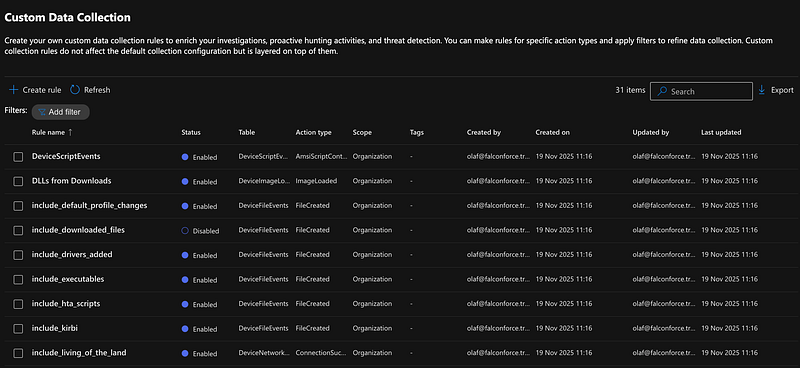
This whole process is well-documented on the Microsoft Learn page, so I won’t repeat that here. When I was getting started on implementing the Custom Collection feature and testing it thoroughly, I quickly realized I needed a more structured and automatable approach. Additionally, the implementation of the rule builder did not feel very pleasant to me personally, especially when building more complex rules. Moreover, there is no quick way to analyze all your rules, besides opening them one by one and going through the wizard for each one.
Automation — TelemetryCollectionManager
Sadly, at this moment, there isn’t an API endpoint that allows us to use a service principal, like a managed identity or app registration, to manage the custom collection configuration. However, by spending some time in the developer tools, I learned that at least the Defender API has a set of endpoints that you can access with a bearer token to manage these rules.
At FalconForce, we’ve built a toolkit for testing and deploying our detection logic, which takes a YAML input. Since this works really well for us and our clients, I also wanted to create a similar workflow for creating and maintaining these custom collection rules.
We’ve designed a YAML schema that will allow the creation of any rule type available in the Defender portal, with several quality-of-life improvements. For example, it allows providing multiple values in a single expression, compared to the multi-line approach in the Defender portal.
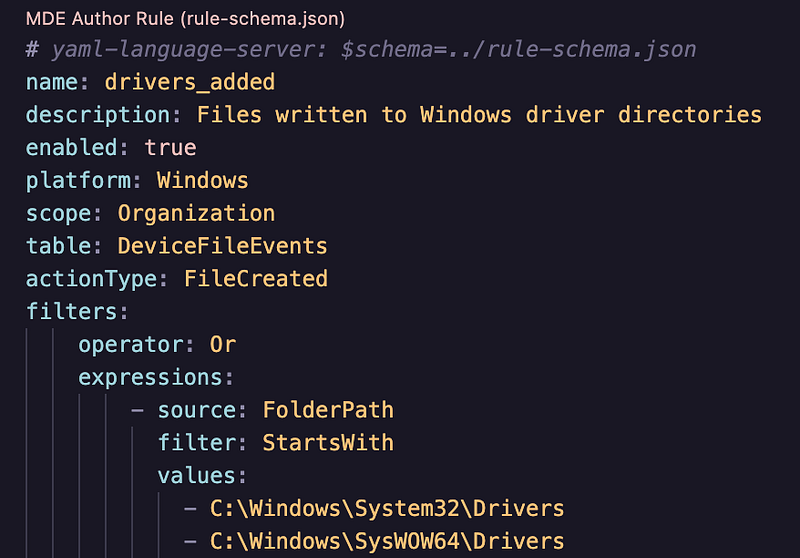
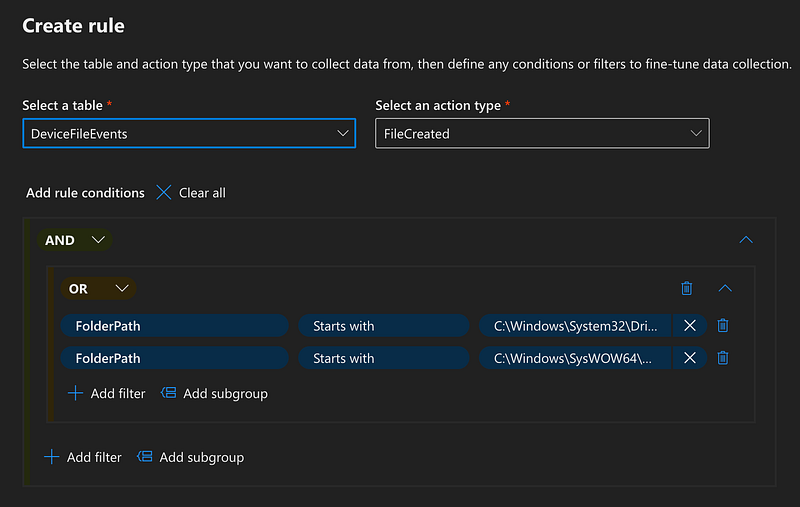
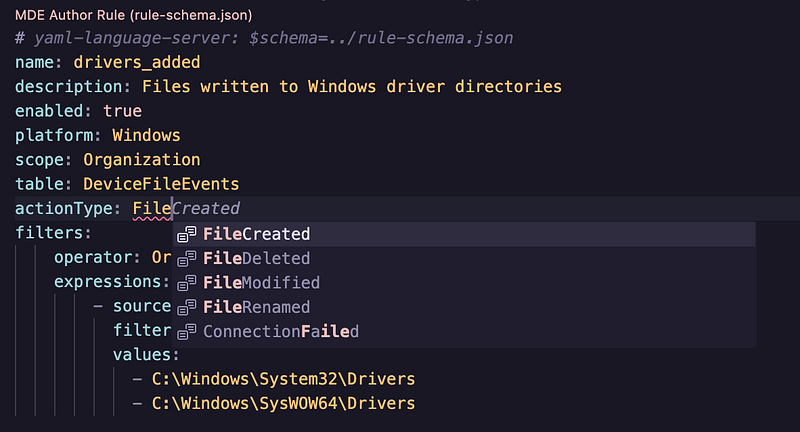
The schema supports multiple values for easier editing, and the repository includes an examples folder with more complex nested rules and combinations. If you use a VSCode-like editor and have installed a YAML language server, you can also benefit from autocomplete options, as it can use the included rule schema.
To enable the deployment and maintenance of these YAML files, we’ve built a Go application that can:
- Validate all YAML files to work with the Defender model.
- Create and update custom collection rules using these YAML files in the Defender portal.
- List or export all custom collection rules in the Defender portal.
- Convert exported rules to YAML files, in case you’ve built several in the portal already and want to transition to maintaining them in YAML.
- Delete individual or all custom collection rules in the Defender portal
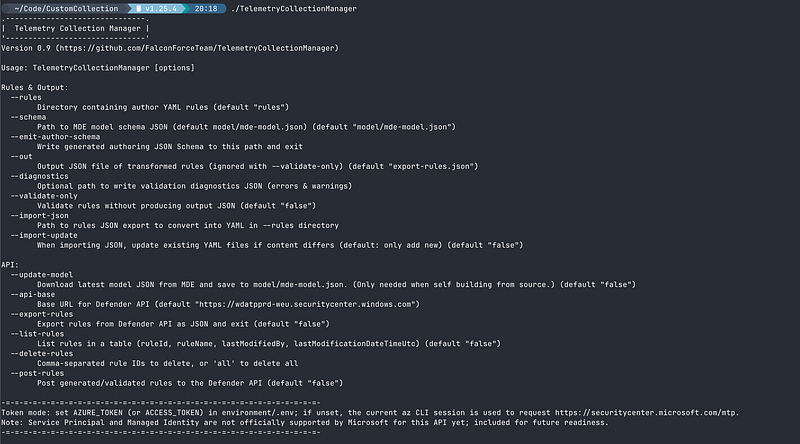
Sadly, at this moment, the application will need a user-based token to access the APIs that expose this functionality. The most convenient way to facilitate this, is to have the Azure CLI logged in with a user that has the proper MDE permissions to make these changes. If this is available, the application will use this session to request the required access token seamlessly. If this isn’t possible in your environment, you’ll have to provide the application with a valid access token each time, which you can retrieve via the browser developer tools.
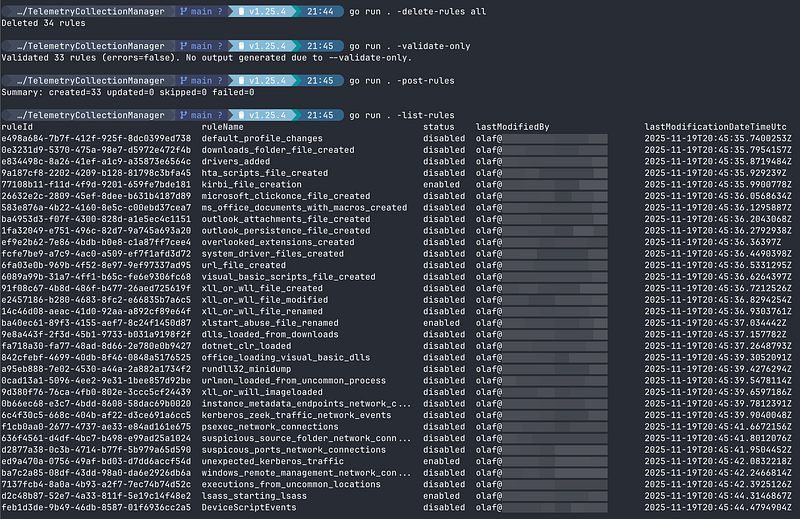
By default, the command output is very minimal by design, as the tool is intended for future pipeline implementation once service principal authentication is supported.
The application is available in our GitHub repository.
When you decide to use these rules, it’s highly recommended to store them in a Git repository, which allows for proper reviews and versioning, ensuring your Git repository is your single source of truth.
With this release, we’ve included several converted Sysmon rules, along with some other rules to kickstart this repository. Our intention for this project is to make it a community effort, where people can contribute rules and help other defenders improve their visibility. We’re welcoming pull requests to this project!
We’ll definitely add more rules over time. This initial release is primarily intended to get people started with a rules-as-code approach.
All rules are added in a non-enabled state by design, as it’s up to the user to decide whether they should log into their environment. We want this repository to be a starting point, like the Sysmon-modular project, where each individual can determine what’s appropriate for their organization.
Happy logging!
Knowledge center
Other articles

FalconFriday: Need for Speed: going underground with near-real-time (NRT) rules – 0xFF26
[dsm_breadcrumbs show_home_icon="off" separator_icon="K||divi||400" admin_label="Supreme Breadcrumbs" _builder_version="4.18.0" _module_preset="default" items_font="||||||||" items_text_color="rgba(255,255,255,0.6)" custom_css_main_element="color:...

How data science can boost your detection engineering maintenance and keep you from herding sheep
[dsm_breadcrumbs show_home_icon="off" separator_icon="K||divi||400" admin_label="Supreme Breadcrumbs" _builder_version="4.18.0" _module_preset="default" items_font="||||||||" items_text_color="rgba(255,255,255,0.6)" custom_css_main_element="color:...

FalconFriday - Detecting enumeration in AWS - 0xFF25
[dsm_breadcrumbs show_home_icon="off" separator_icon="K||divi||400" admin_label="Supreme Breadcrumbs" _builder_version="4.18.0" _module_preset="default" items_font="||||||||" items_text_color="rgba(255,255,255,0.6)" custom_css_main_element="color:...

FalconForce realizes ambitions by working closely with its customers in a methodical manner, improving their security in the digital domain.
Energieweg 3
3542 DZ Utrecht
The Netherlands
FalconForce B.V.
[email protected]
(+31) 85 044 93 34
KVK 76682307
BTW NL860745314B01