
Sentry Respond: alert enrichment & automation solution
Reduce incident handling effort, so your SOC can focus on real threats
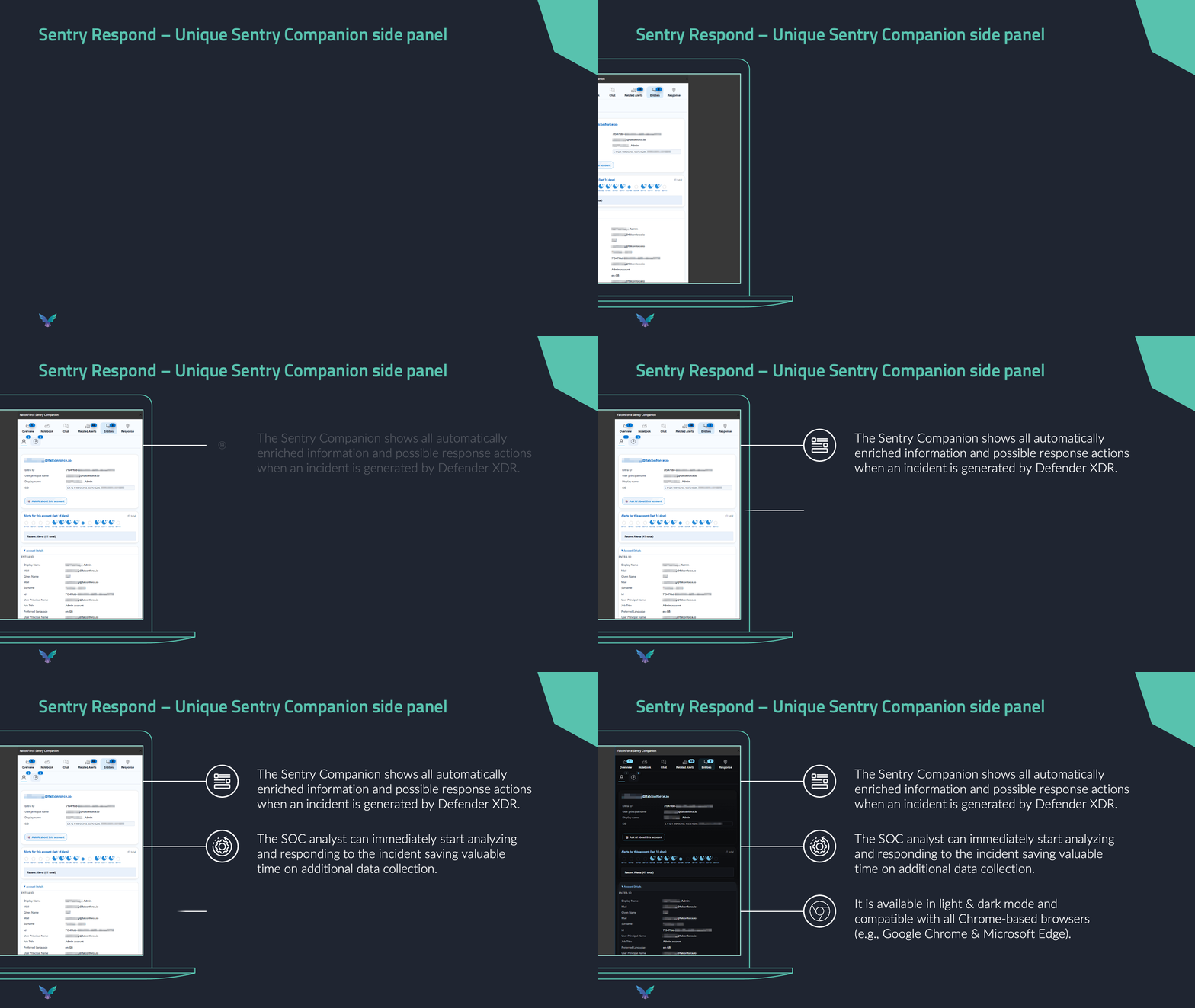
Sentry Respond brings enriched context, risk-based prioritization and response actions into the incident workflow your analysts already use. That means less time gathering information and repeating manual steps, and more time making sound decisions on high-risk incidents, while keeping data in your Azure environment.

Give analysts the context they need the moment they open an incident
Enrichments & connectors
- Enrich the incident before the analyst starts
- Build your own enrichments in JavaScript, Azure Logic Apps and webhooks
Reduce tab switching, repetitive triage work, and manual response effort
Sentry Respond’s interface integrates with XDR
- AI chat and agents support your analysts with any incident
- The KQL agent can query in Sentinel / XDR


Standardize decisions and response actions without giving up control
Automation & playbooks
- Develop, test and deploy automations faster
- Use built-in connectors for commonly-used automation sources
Why incident handling matters more than ever
80/20 efficiency problem
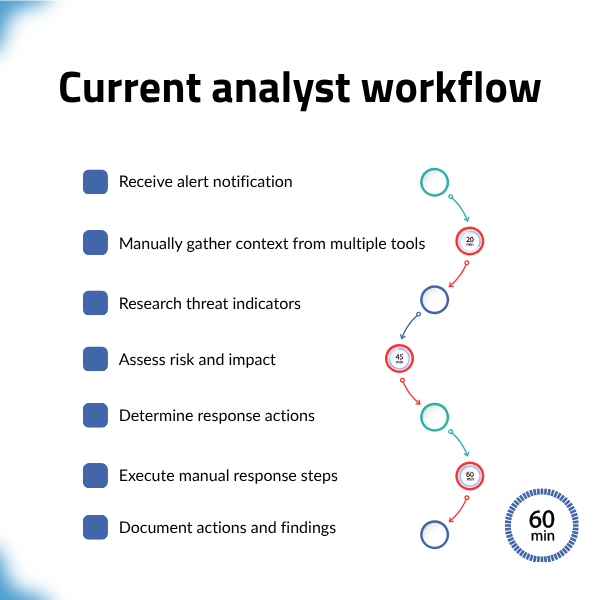
Most SOC teams waste 80% of their incident analysis time on gathering contextual information, checking multiple systems or manual lookups, and spend only 20% on actual analysis.
Alert fatigue & decision quality
Overwhelming alert volumes lead to poor decision-making, causing analysts to dismiss potentially serious threats.
Manual response workflows
Automations are often missing, fragile, or they have become a black box nobody understands.
Sentry Respond is an automated enrichment & incident response platform for enterprise SOC teams using Microsoft Defender XDR and Sentinel
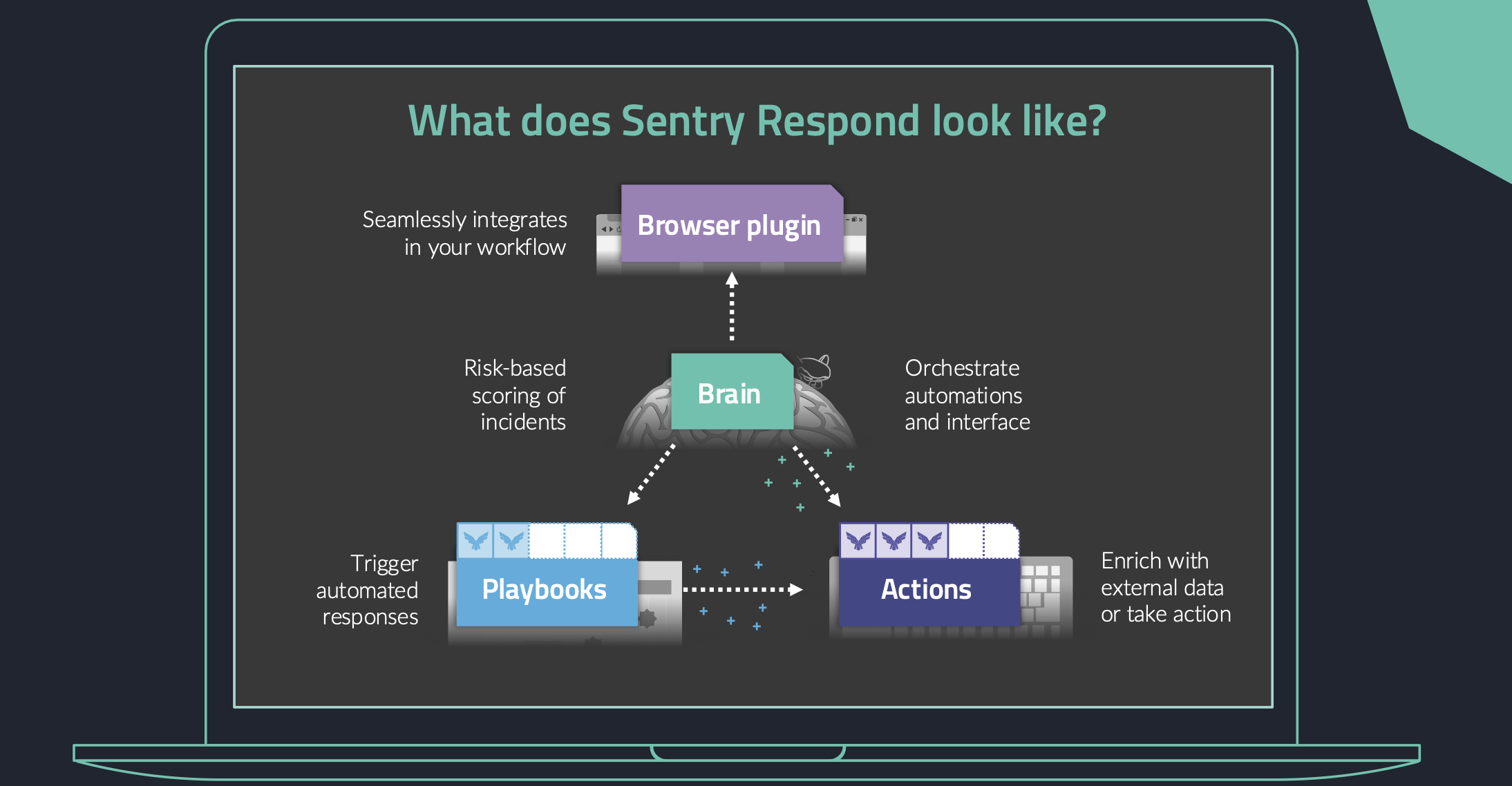
See how it works:enrichments, response orchestration, and a browser plugin interface for your analysts
Enrichments & connectors
Pull together relevant context from internal and external sources and present it in the analyst’s UI workflow.
The platform applies risk-based prioritization, so incidents are not handled purely in queue order or based on individual analyst judgement.
Extendable connectors can be used with enrichments:
- Azure Blob storage
- Azure Databricks SQL
- Azure Data Explorer
- Azure Log Analytics
- Azure Entra ID
- BloodHound
- CrtSH
- EntraScopes
- IPQualityScore
- Joe Sandbox
- Defender for Endpoint
- Defender for Office
- Microsoft Security Threat Intelligence
- Sharepoint
- Shodan
- Slack
- VirusTotal
- XDR
Browser plugin & playbook editor
The Sentry companion browser plugin puts enriched information next to Defender / Sentinel.
Keeping the workflow inside the environment your team already uses, while Sentry Respond’s “Brain” orchestrates interaction between playbooks, actions, automations and the browser plugin.
Showing enriched data from external systems (such as IPAM, SailPoint, BloodHound) without opening new tabs.
The playbook editor allows users to write automation logic in JavaScript, Python, or C# (full-code), providing more flexibility than “no-code” drag-and-drop tools.
Automations
Develop, test and deploy automations using our web-based IDE. You can use the integrated AI coding assistant to support you. The platform has built-in connectors for commonly-used automation sources. Mobilize your team to build their own automations, or ask FalconForce to support with additional custom playbooks, as needed.
Easy troubleshooting of automations in production with extensive logging and health monitoring of your automations. You can define your own conditions for triggering automations.
Sentry Respond helps enterprise SOC teams using Sentinel and Defender to reduce incident handling effort by delivering enriched context, risk-based prioritization, and response actions in the analyst workflow. What makes the approach different is not just automation. It is workflow-native, in-tenant, extensible automation built for real Microsoft-first SOC environments with multi-vendor complexity.
Save time, build better and faster automations responding to overwhelming threat alerts
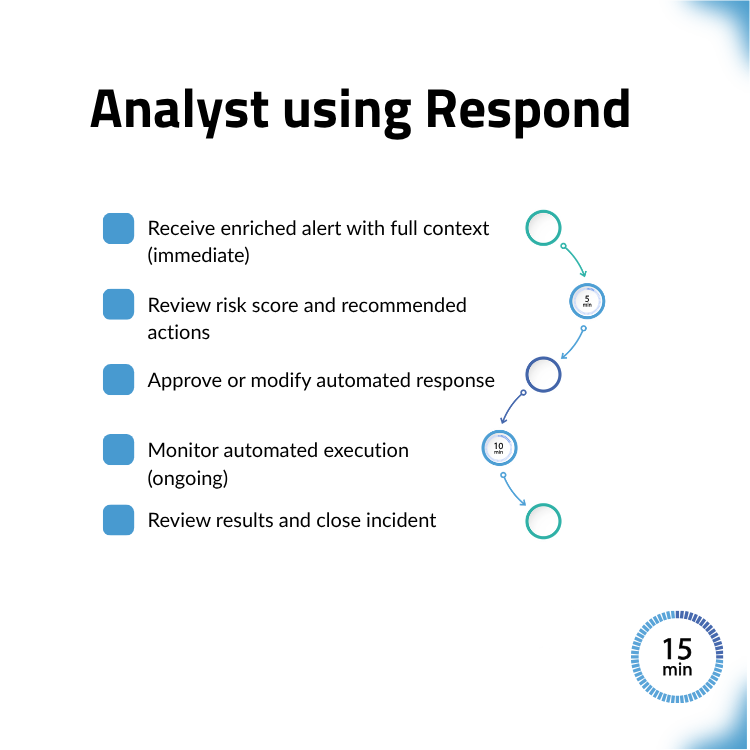
How Sentry Respond handles common incident scenarios
Scenario 1: Phishing attack response
- Incoming phishing email triggers detection
- Platform automatically gathers user activity, email metadata, and related events
- Checking whether it is actually phishing or not
- Risk scoring identifies high-priority threat
- Automated response: isolates user account, quarantines email, and sends reply back
Scenario 2: Lateral movement detection
- Suspicious authentication events across multiple systems
- Platform correlates events, identifies attack pattern
- Enrichment provides complete attack timeline
- Automated network isolation prevents further spread
- Evidence collection, catching suspicious lateral movement two days earlier than with manual investigation; your team can stop or slow down the attack, rather than only reacting after the fact
Decrease alert volume and incident handling efforts
Reduce alert volume
Automatically close low-risk or known-safe alerts
Faster triage
Reduce the time spent switching between tabs during an investigation (IPAM, DHCP logs, HR systems)
Maintainable automation
Typical approach: automation becomes fragile, opaque, and difficult to debug as it grows
Sentry Respond: a platform with playbooks built as proper software, with a code-first mindset and debugging feature
Multi-vendor support
Typical approach: enrichment is strongest inside one vendor’s stack, while important external systems remain siloed
Sentry Respond: internal and external sources can be brought together in one investigation flow, enabling your SOC to build complex, reliable automations that adapt to a multi-vendor environment
Consistent decision making
Ensuring every analyst looks at the same enriched data and follows the same logic, regardless of experience level
Native (Azure) context
Typical approach: analysts pivot across tabs and systems to assemble enough context to decide
Sentry Respond: enriched information appears alongside Defender / Sentinel, where the analyst is already working
Consistency at scale
Typical approach: every analyst triages a little differently under pressure
Sentry Respond: normalized entities, risk-based prioritization, and common response logic support more consistent decisions
Improved team capabilities
Typical approach: analysts spend 80% of their time gathering information and only 20% on actual analysis
Sentry Respond: analysts do more meaningful work, reducing burnout and alert fatigue
Built together with real SOC teams
Current stage: Sentry Respond is currently being validated with multiple POC clients ahead of launch
What is being validated: focus on reducing manual incident handling effort, improving triage consistency, and giving analysts more time for real analysis
Best fit for large enterprise and mid-market SOC teams looking for security orchestration, automation and response (SOAR)
We are happy to meet you and discuss how we can help. Please reach out to Givan to start a conversation!
Email: [email protected]

Frequently asked questions
Is any data (enrichment, alerts, etc.) leaving my Azure environment?
The Sentry Respond platform runs in your Azure environment. No data is sent to FalconForce. If you want to optionally add AI chat functionality, you can add your own, restricted model. You choose yourself which external sources you want to use for enriching data (e.g. VirusTotal).
Can the solution be extended to my team?
Yes, certainly. Sentry Respond enables your SOC team to create its own automations for enrichment and response actions. FalconForce will add data connectors to allow you to include more data sources in those automations.
Can I get more details on the platform and see a demo?
Sure, we are happy to tell you more. Please contact Givan via [email protected]
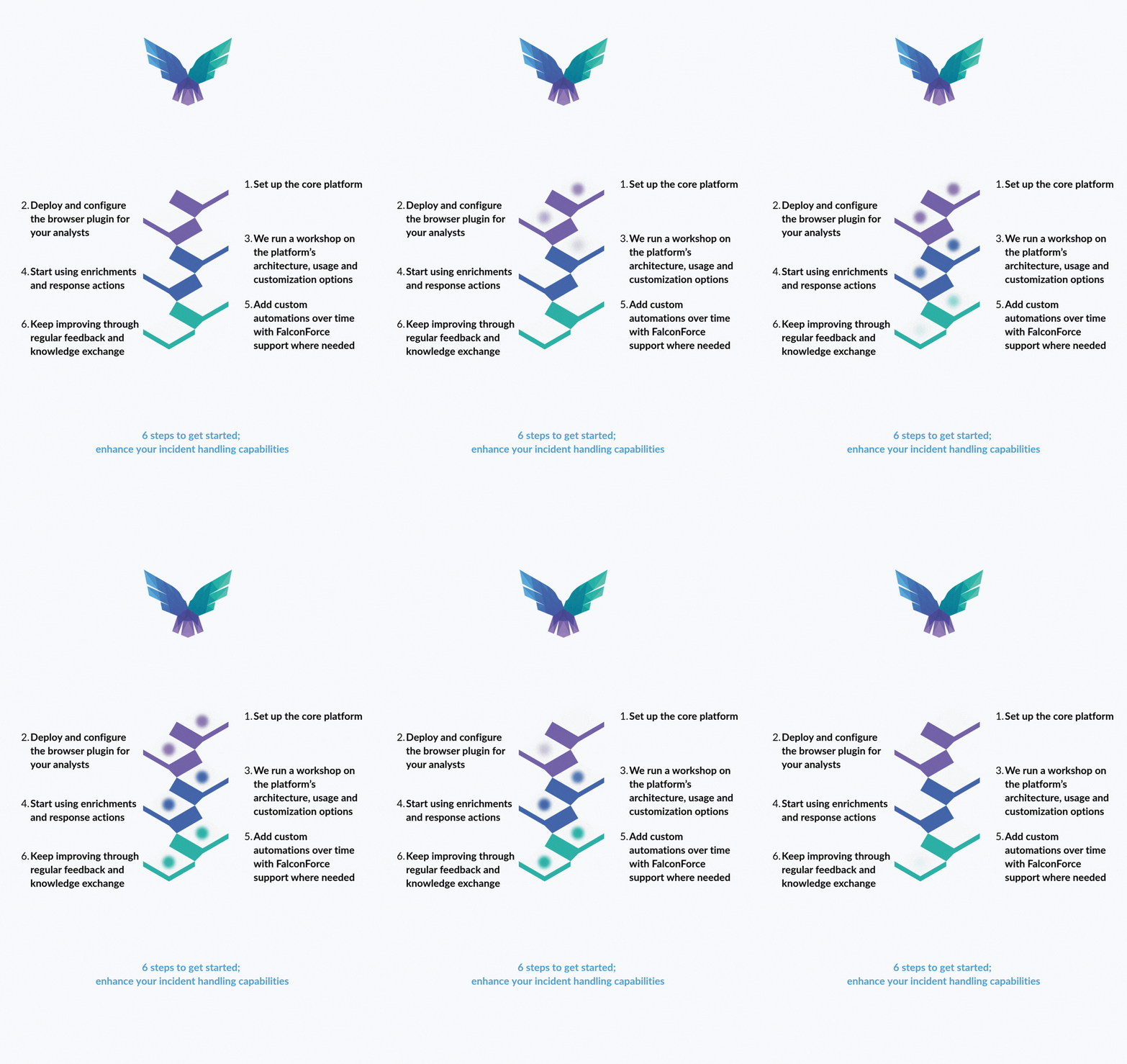
What are the next steps to get started?
We propose an introductory pilot of 6 months, while we validate impact together.
What is included in the plan and pilot?
Our extendable Sentry Respond platform includes a core set of playbooks, connectors and actions.
Platform installation and tuning in your environment is included.
Onboarding training for your analyst team.
Maintenance of the Sentry Respond platform.
New features and core set content will be delivered regularly.
Option: to buy additional custom development.
What is so different from other platforms?
The Sentry Respond platform:
- pro-actively enriches incident information, so your analyst starts with all relevant contextual information to do the analysis and make the right impactful decisions.
- presents relevant information next to the XDR portal, so in your analyst’s workflow, instead of having to move between multiple different screens and tools.
- is customizable and offers transparent pricing, so your analysts can tailor to your environment, while you remain in control of costs.
Energieweg 3
3542 DZ Utrecht
The Netherlands
FalconForce B.V.
[email protected]
(+31) 85 044 93 34
KVK 76682307
BTW NL860745314B01